
TipRanks Stock Market Analysis
TipRanksFinance
4.6487.00 Reviews
- Version
- 3.46.1prod
- Installs
- 500.00K
- Age Rating
- Everyone
Screenshots

Our Review of TipRanks Stock Market Analysis
 Analysis by Appyee
When I want to check a company without opening several finance apps and bouncing between headlines, charts, and watchlists, I like having an analysis tool that brings those tasks together. TipRanks Stock Market Analysis is built around that kind of research: it combines stock tracking and screening with portfolio views, charts, news, and analyst-related information. I find it most useful as a place to organize questions and follow companies, not as a shortcut to deciding what to buy.
That distinction matters. Financial apps can make a large amount of market information feel easy to act on, even when the information is only one part of a much bigger decision. I use TipRanks to compare signals and keep an eye on a watchlist, then treat anything I find as a prompt to do more research. If you approach it that way, its range of tools can be practical without asking the app to make investment choices for you.
Where the app stands today
This is a finance app from TipRanks, and its focus is clearly on stock research rather than banking or managing everyday spending. Its current version is 3.46.1prod, and it is listed for Android devices running version 7.0 or later. The app is free to install, with in-app purchases ranging from $2.99 to $599.99 per item, so I would check what a paid option includes before committing to it.
TipRanks has an average rating of 4.6 from around 9,400 ratings, with about 487 written reviews, and has been installed over 500,000 times. Those figures suggest that it has found an audience among people who want investment research on a phone, though popularity alone cannot tell you whether its approach fits your habits. It is rated for Everyone, but the subject matter is aimed at people comfortable reading financial information—or willing to learn how to interpret it carefully.
Its broad appeal is easy to understand: instead of using one app to follow prices, another to read company news, and a separate tool to maintain a research list, you can start with TipRanks and see whether it covers enough of your routine. That convenience is most valuable when you follow several companies and want a repeatable way to check them. If you only look up a stock occasionally, a simpler quote app may be quicker.
Using TipRanks as a research workspace
Opening up TipRanks Stock Market Analysis for the first time, I was immediately impressed with its clean and intuitive design. The developers have clearly prioritized user experience, making navigation a breeze. Everything feels like it’s right where it should be, and it didn’t take long for me to find my way around.
One of the first things that caught my eye was the dashboard, which offers a quick overview of market trends, personalized watchlists, and top analyst recommendations. With its vibrant charts and easy-to-read data points, it really does feel like having a personalized stock market hub.
For a useful first session, I would avoid trying to explore every tool at once. Pick a few companies you already know, add them to a watchlist, and use the app to inspect their charts and related news. That gives you a practical feel for how its research pieces fit together, rather than leaving you with a dashboard full of unfamiliar names and indicators.
Reading analyst signals without outsourcing judgment
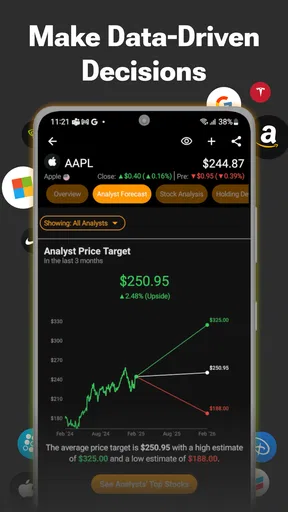
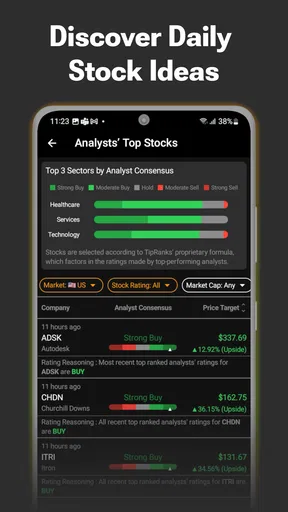
Now, let’s talk features, because this app is packed with them. One standout is the Analyst Ratings tool, which aggregates ratings from top Wall Street analysts. This feature alone is worth its weight in gold (or Bitcoin, if that’s more your style). It’s incredibly helpful to see a consensus of expert opinions, especially if you’re trying to make informed decisions.
My main caution is that a consensus is a summary, not a guarantee. Analysts can disagree, their views can change, and even a widely shared opinion can be wrong. I would use the ratings as a way to spot where opinions cluster or diverge, then check the company’s own circumstances and recent news before drawing a conclusion. A strong-looking consensus should not replace your own time horizon, risk tolerance, or research.
A practical way to use this tool is to compare the analyst view with what you already believe about a company. If they point in different directions, that difference is worth investigating; it may reveal an assumption you missed or a risk you have not considered. If they agree, I still would not treat that as proof that the stock is suitable for my portfolio. The app can help frame the question, but it cannot know your financial situation.
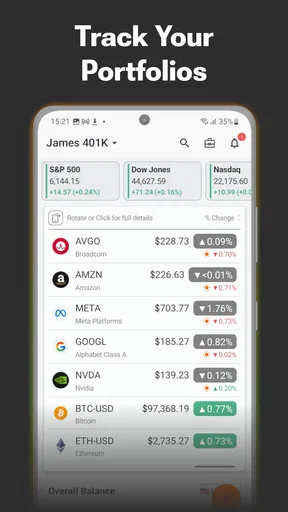
There's also the Smart Portfolio feature. It’s like having a personal financial analyst who never sleeps. You can track your investments, get real-time updates, and receive insights that help you understand your portfolio's performance better. Plus, you can compare your portfolio against benchmarks to see how you stack up.
Portfolio tracking becomes more informative when I use it to notice concentration rather than simply celebrate gains. For example, if several holdings are exposed to similar parts of the market, a portfolio view can prompt me to ask whether I have more overlap than I intended. Comparing performance with a benchmark can add context, but it does not explain why a difference occurred or tell me what action to take. I would treat that comparison as a starting point for review, not a scorecard.
The Insider Trading feature is another gem. It lets you see what the big insiders are doing with their own companies' stocks. If they're buying or selling, you’ll know about it. Keeping an eye on these moves can give you a unique perspective on market sentiment.
Insider activity is easiest to misread when it is taken out of context. A transaction is a clue to investigate, not a plain-language verdict on a company’s future. I would look at it alongside the company’s news and other research, rather than reacting to a single buy or sale. That restraint makes the feature more useful: it can help me notice a development I might otherwise overlook without turning every transaction into a trading signal.
Building a research routine that holds up
For those who are new to investing, or even seasoned investors looking to sharpen their skills, the app provides a treasure trove of educational resources. From straightforward tutorials to in-depth articles, there's something for everyone. I found the TipRanks Academy particularly insightful, offering courses that range from beginner tips to advanced strategies.
Additionally, the app fosters a sense of community with its Investors’ Network. It’s a fantastic place to exchange ideas, discuss strategies, or just chat about the latest market trends. Engaging with other users adds a social element that makes the sometimes solitary world of stock investing feel a bit more connected.
For someone learning the basics, educational material can be a useful companion to a watchlist: when a chart or investing term raises a question, learning the concept before acting is a better habit than guessing. Community discussion can offer perspectives, too, but I would separate opinion from evidence. A confident post is not automatically a reliable analysis, so I would verify claims using the app’s research tools and other trustworthy sources.
One everyday workflow I find sensible is a brief check-in rather than constant monitoring. On a lunch break, I might open a watchlist, see whether a company has new coverage or a notable chart move, and save anything that needs closer attention for later. That keeps the app in the role of a research organizer. It also reduces the temptation to turn every price change into an urgent decision.
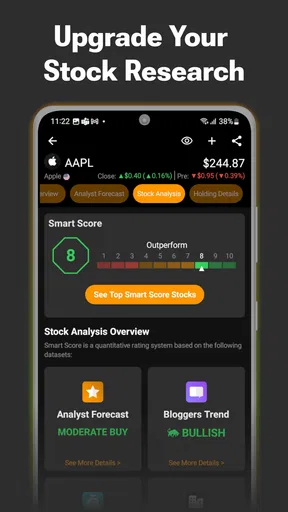
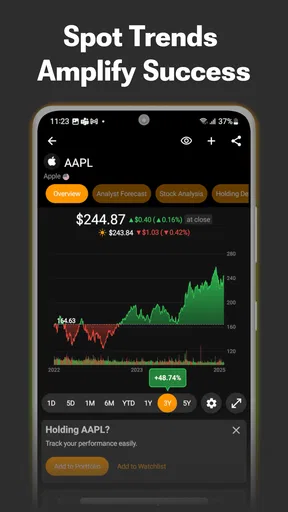
The stock screener and charts serve different parts of that routine. A screener can help narrow a broad field when I have a question—such as what companies might merit further research—while a chart helps me inspect how a particular stock has moved over time. Neither tool can define a good investment by itself. I would use screening to generate candidates, then investigate each one rather than treating a filtered result as a recommendation.
What it does well, and where I would be careful
In terms of performance, the app runs smoothly without any noticeable lag, which is crucial when timing is everything in the stock market. I’ve been using it on both my Android phone and iOS tablet, and the experience has been consistently reliable. Updates are frequent, ensuring that the app stays current with the ever-changing market landscape.
Security is also a top priority. The app requires secure logins and employs robust encryption to keep your data safe. This gives me peace of mind, knowing that my personal and financial information is well-protected.
I would be cautious about relying on any finance app as my only source of truth. A convenient dashboard can bring information together, but investors still need to check the details that matter to their own decisions. Likewise, a portfolio tool is most useful when its holdings and assumptions reflect what you actually want to track. Before relying on a portfolio view, take time to make sure you understand what you have entered and how you are interpreting the comparison.
TipRanks is a better fit for someone who enjoys researching individual stocks than for someone who wants a hands-off investing experience. If your priority is placing trades, managing cash, or keeping a simple account balance, a brokerage or banking app may be a better main tool. If you want a quick price lookup and little else, a basic market tracker will likely feel less involved. TipRanks makes more sense when you want to connect stock information, opinions, and portfolio monitoring in one research habit.
The free entry point is appealing, but I would not assume every useful feature is included without cost. Since in-app purchases are available across a wide price range, I would first use the free experience to identify what you actually need, then inspect the purchase terms carefully before paying. That is especially important if you only need occasional research; a paid tier may not be worthwhile for someone who checks a handful of stocks now and then.
What I would watch as the app evolves
TipRanks was released on Dec 6, 2020, and its current version, 3.46.1prod, shows that the app has continued to receive version updates. That is useful context for existing users: an app can change over time, so I would pay attention to what an update actually changes rather than assuming a newer version automatically improves the parts of the experience I use most.
From my point of view, the most meaningful future improvements would be the ones that make research easier to interpret: clearer context around signals, straightforward explanations of portfolio comparisons, and a smoother way to move from a screening idea to a considered watchlist. Those are expectations, not claims about what a future release will contain. For now, I would judge the app by how well its current tools help me ask better questions, not by features I hope might arrive.
Readers often wonder whether TipRanks is suitable for beginners. I think it can be, provided a new investor is comfortable taking things slowly and treating ratings, charts, and community posts as material to learn from rather than instructions. The educational resources give beginners a place to build familiarity, but the number of financial signals can still feel like a lot. Someone who wants a very guided, minimal experience may prefer a simpler learning-first resource.
Another reasonable question is whether it replaces a broker or a financial adviser. I would not use it that way. It is a research and tracking app, not a substitute for an account used to place trades or for qualified advice tailored to your circumstances. If you need to make a major financial decision, use the app as one research input and seek the kind of professional help appropriate to that decision.
Who I would recommend it to
After spending some quality time with TipRanks Stock Market Analysis, I can confidently say it's a must-have for anyone serious about investing. Whether you're just getting started or are a seasoned pro, the app’s comprehensive features and insightful data can help guide your investment decisions.
I would put that recommendation more narrowly: it is worth trying if you follow individual stocks, like comparing different kinds of research, and want a mobile place to organize that work. Experienced investors may appreciate the convenience of combining several research angles, while a curious beginner can use the educational material to become more comfortable with market language. It is less compelling for someone who does not want to research investments or who expects a single app to tell them exactly what to buy.
Overall, it’s the combination of powerful tools, user-friendly design, and a strong community that sets this app apart from the rest. So, if you're ready to take your stock market analysis to the next level, give TipRanks a try. You might just find that it’s the missing piece in your investment strategy puzzle.
My more practical takeaway is that TipRanks works best as a companion to a thoughtful process: use a screener to find possibilities, a watchlist to follow them, and ratings, charts, news, and portfolio views to decide what deserves a closer look. Keep a skeptical eye on every signal, especially when money is involved. If that approach sounds like how you want to research, the free app is a reasonable place to start; if you want effortless answers or a trading account first, another kind of finance app will suit you better.
Verdict
Strengths of TipRanks Stock Market Analysis
- Comprehensive stock analysis tools.
- User-friendly interface for easy navigation.
- Real-time data updates.
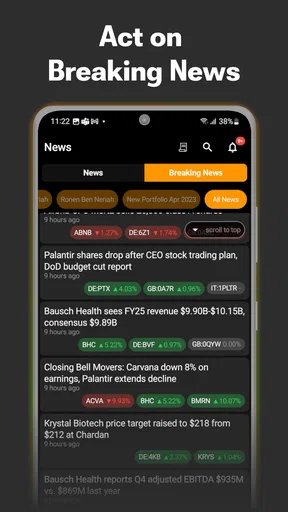
- Wide range of financial news sources.
- Customizable alerts for stock movements.
Limitations of TipRanks Stock Market Analysis
- Limited features in free version.
- Occasional lag in data loading.
- Ads can be intrusive at times.
- Requires internet connection to function.
- Some features locked behind paywall.
Similar Picks in This Category
View All
Google Wallet
Google LLC4.3

Airtel: Recharge, Bank & Loans
Airtel4.0

PayPal - Pay, Send, Save
PayPal Mobile4.2

DANA Indonesia Digital Wallet
PT Espay Debit Indonesia Koe4.5

Binance: Buy Bitcoin & Crypto
Binance Inc.4.8

Cash App
Block, Inc.4.7
Frequently Asked Questions
What is TipRanks Stock Market Analysis app?
TipRanks Stock Market Analysis is a comprehensive tool designed for investors looking to make informed decisions in the stock market. It provides insights and data from analysts, bloggers, and insiders, compiling it into an easy-to-understand format. Users can access stock ratings, price targets, and financial news, making it a valuable resource for both novice and experienced investors.
Is TipRanks suitable for beginners in stock trading?
Yes, TipRanks is suitable for beginners as it offers user-friendly features and educational content to help new investors understand market trends. The app aggregates expert opinions and presents them in a simple manner, allowing users to make informed decisions without needing extensive market knowledge. Tutorials and guides are also available to assist new users.
What platforms is TipRanks available on?
TipRanks Stock Market Analysis is available on both Android and iOS platforms. Users can download it from the Google Play Store or the Apple App Store. The app is designed to provide a seamless experience across devices, ensuring that users can access their stock portfolios and market insights on the go.
Does TipRanks offer real-time stock data and alerts?
Yes, TipRanks provides real-time stock data and alerts. Users can customize notifications for specific stocks or market news, ensuring they stay updated with the latest developments. The app's real-time capabilities are essential for traders looking to react quickly to market changes, helping them make timely investment decisions.
Are there any subscription fees for using TipRanks?
TipRanks offers both free and premium subscription plans. The free version provides access to basic features, while the premium plan unlocks advanced tools, in-depth analysis, and additional expert insights. Users can choose a plan based on their investment needs and budget, with the option to upgrade or cancel at any time.
